Access Token Retrieval
After adding an OAuth 1 profile to a request, you can enter an existing access token, retrieve a new token from the server, or configure how the profile handles access and refresh tokens.
OAuth 1 authorization requires the Access Token and Token Secret values.
Retrieving an OAuth 1 Access Token
In the Navigator, in Functional tests, expand Project, Test Suite, Test Case, and select Request.
In the request editor, select the Auth tab at the bottom of the Request panel.
Click Get Access Token.
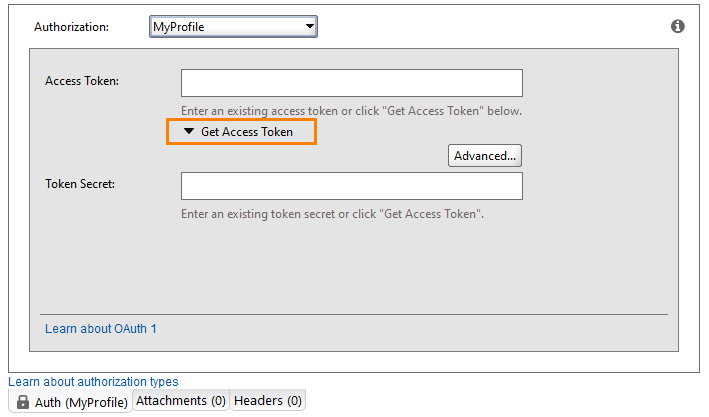
The Get access token from the authorization server form opens. Enter the following details:
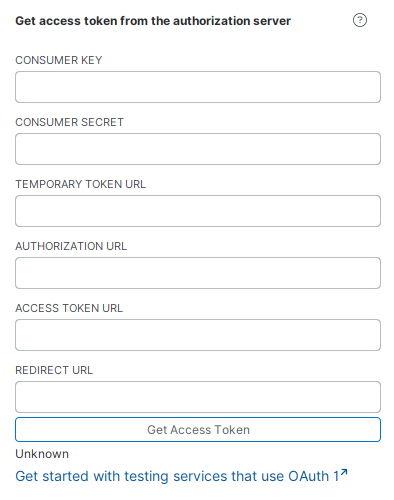 Table 47. Get access token form fields
Field
Description
Consumer Key
The identification string for the client application, generated by the service provider - the API from which you retrieve data.
Consumer Secret
The secret string for the client application. The service provider generates this value.
Temporary Token URL
URLThe URL used to obtain the access token (also called the request token URL).
Authorization URL
The URL of the authorization server.
Access Token URL
The URL used to obtain the access token.
Redirect URL
The URL used to return the access token after authorization.
OAuth 1 Advanced Options
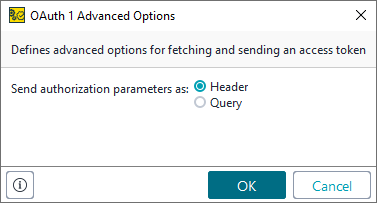
The Advanced button opens the OAuth 1 Advanced Options dialog, where you specify how the access token is sent.
 |
Option | Description | Example |
|---|---|---|
Header | The access token is sent as a request header. |
|
Query | The access token is sent as a query parameter. |
|
Note
The 1/ prefix in the Query example is part of the OAuth 1.0 token format. Your actual token value follows this prefix. The Header example uses the Bearer token format, which does not include this prefix.