OAuth 1 Authentication Tutorial
This tutorial explains how to enable OAuth 1.0 authorization for a REST request. To configure OAuth 1.0 authorization, complete the following steps:
Create and configure an authorization profile.
Retrieve an access token.
1. Add an Authorization Profile
Add an OAuth 1.0 authorization profile:
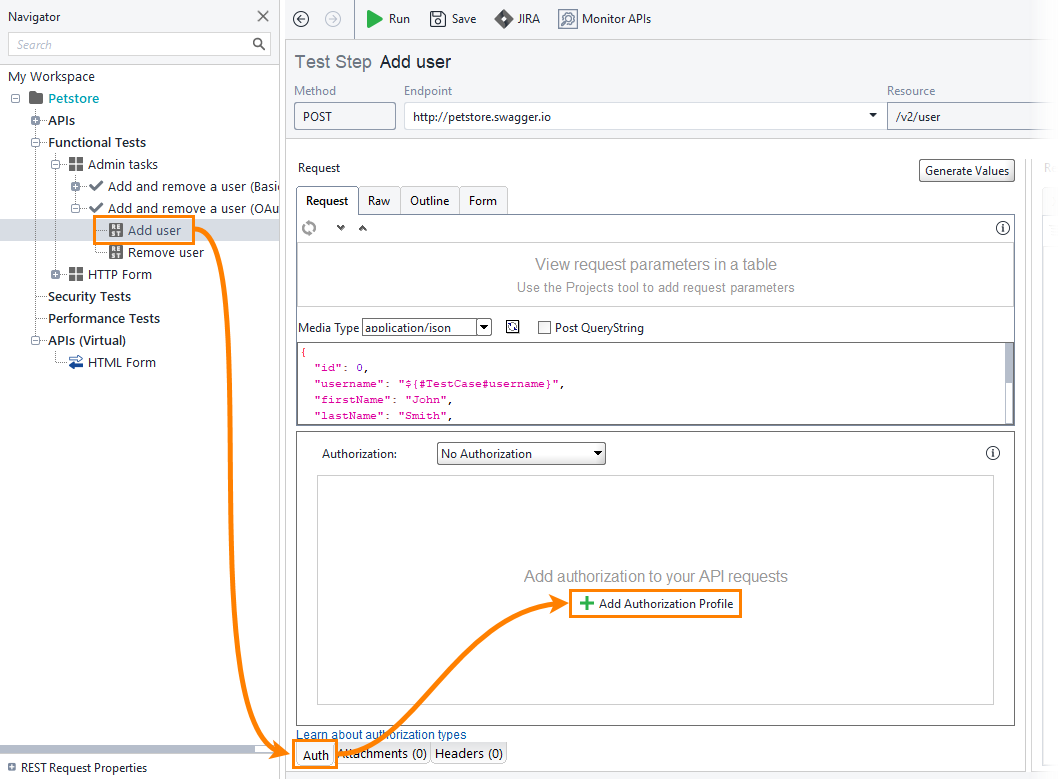
Open a REST request.
Open the Auth panel and click Add Authorization Profile.
In the Add Authorization Profile dialog, select OAuth 1.0 from the Type dropdown and enter a profile name. Click OK.
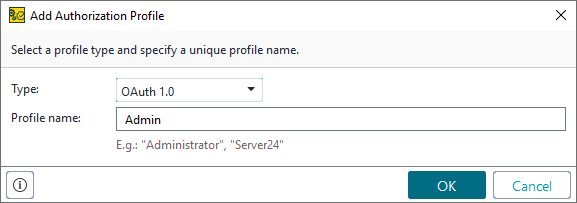
ReadyAPI adds a new OAuth 1.0 authorization profile to your project.
2. Get an Access Token
OAuth 1.0 requires an Access Token and Token Secret to access a protected resource. If you already have these values, enter them in the corresponding fields. If you do not have these values, follow these steps:
Click Get Access Token.
In the Get access token from the authorization server form, enter the following details and click Get Access Token. For details, see Access Token Retrieval.
Table 49. Get access token form fieldsField
Example Value
Consumer Key
key1Consumer Secret
secret1Temporary Token URL
http://endpoint.example.com/OAuth1/Service/1/auth.ashxAuthorization URL
http://endpoint.example.com/OAuth1/Service/1/auth.ashxAccess Token URL
http://endpoint.example.com/OAuth1/Service/1/auth.ashxRedirect URL
http://endpoint.example.com/OAuth1/ClientReadyAPI displays the login page of the service you are connecting to. Enter your credentials.
ReadyAPI retrieves the Access Token and Token Secret values and automatically populates the corresponding fields. The OAuth 1.0 authorization profile is now ready to use in your requests.