Relative Paths to Project Resources
By default, ReadyAPI uses absolute paths to files. This approach may be flawed when you use the same test on multiple machines or share it with multiple users, because not all of them will have the files you need in the same place. To resolve this issue, use the Resource Root project property. If this property is specified, ReadyAPI uses relative paths starting from the specified folder.
Select the project in the Navigator.
In the Project Properties tab, find the Resource Root property and specify a new value.
Press Enter to save the changes.
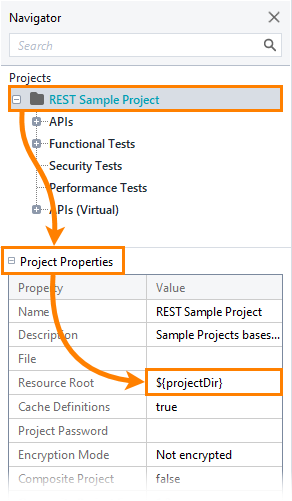
Selecting the Root Folder
You can specify the root folder in the Resource Root project property and the absolute path to the folder location, or use one of the following options:
${projectDir} – The path to the folder the project is stored in.
${workspaceDir} – The path to the folder containing the workspace file. The default ReadyAPI workspace is stored in the
C:\Users\<username>\folder.
For TestEngine and a composite project that uses external resources (like a Groovy script), follow the rules described below:
The composite project zip archive must contain a folder with files, not just files.
That folder name is used while the Test Case is importing an external library (like Groovy). For example, if in the Test Case script, the library is imported in the following way
<script>import Sample.Callee; /* script code */</script>, then the composite project folder name must be equal toSamplebecause forscriptLibrary="${projectDir}"project library location is resolved as${projectDir}/Sample/Callee.groovy.Download a sample project with a Groovy script, for example, that shows how a Zip file should be structured for customer reference.
Important
The LoadUI agent does not support using ${projectDir} and ${workspaceDir} as values of the Resource Root property.
Default value
By default, the value of the resource root property is empty. In this case, if you import a project on another machine and the files associated with it cannot be found in the folders specified in the project, ReadyAPI will automatically look for them in the project folder.
Sample Usage
Relative paths are most commonly used to share projects and related files by using source control systems. In this case, the project, workspace and related files are stored in the same folder. For example:
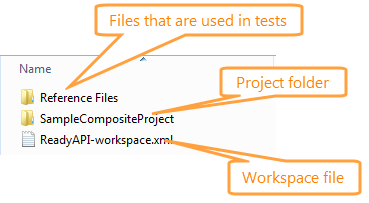
In this case, both ${projectDir} and ${workspaceDir} point to the same folder. Then, you can continue from it to get the files you need. For example, to get a file in the Reference Files folder, you can use the Reference Files/SampleFile.xml path.