Virtual Service Script Editors
About
Groovy scripts can be used in virtual services for many purposes, such as forming and dispatching virtual responses, asserting incoming requests, and many more. For details, see Virtual Service Scripting.
The editors support all the standard features of ReadyAPI scripting editors, such as property expansions, code validation, and code templates.
Script objects
Below is a list of the default objects that are available in the virtual service script editors:
Object | Description |
|---|---|
| Provides a scripting interface to the virtual service, responses, and virtual service runner. Use the |
| Includes methods and properties for posting messages to the Script log (to view this log, click Logs in the bottom left corner of the ReadyAPI window and switch to the Script log tab). You use this for debugging and logging purposes: to post and view data in the log. |
| Used in JMS virtual services. Provides a scripting interface to the JMS message body and headers. |
| Corresponds to a virtual operation. Provides a scripting interface to the virtual response and request data, assertions, dispatch settings, and other properties. |
| Provides a scripting interface to the incoming request. Use methods and properties of this object to get the query string, port, headers, body, and other data. |
| Provides a scripting interface to the virtual response data defined in a virtual service for a response. You can use the |
| A lightweight, high-performance alternative to NoteThe |
| Provides a scripting interface to the entire message exchange procedure: request, response, and assertion results. |
| Provides a scripting interface to the virtual service runner. You can use this object's methods to stop the current service. |
| Provides a scripting interface to the request context. Use the |
You can see methods and properties of these objects on the Code Completion list. To invoke it, type the object name and press Ctrl+Space.
Object reference
To learn more about an object, find it in the API docs. API docs describe the internal structure of ReadyAPI; however, the names of objects used in the scripting editors are not necessarily the same as the names in the internal structure of ReadyAPI. To find an object in the documentation:
Use the
getClass()method available to every object in ReadyAPI to find the class name.Post the result to the Script Log using the
log.info()method.
For example, for the context object, the script will look like this:
def className = context.getClass();
log.info(className);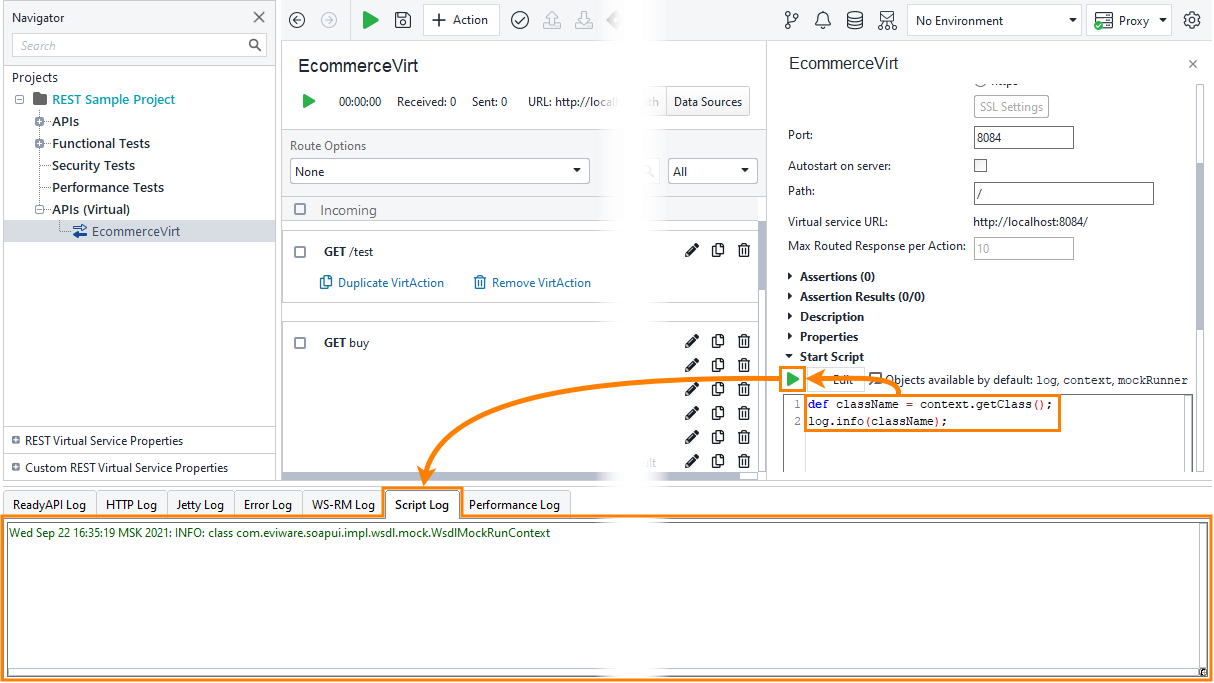
Examples
You can find examples of virtual service scripts in the Virtual Service Scripting topic.