AWS Signature
Use the AWS signature to authenticate your Amazon Web Services requests. It adds authentication information to the Authorization header.
Important
ReadyAPI supports only Signature Version 4.
Tip
ReadyAPI stores the OAuth 1.0 authorization profiles in the Authorization Manager, so you can later apply them to other requests or test steps. Also, you can use such profiles to specify different authorization settings in various Environments.
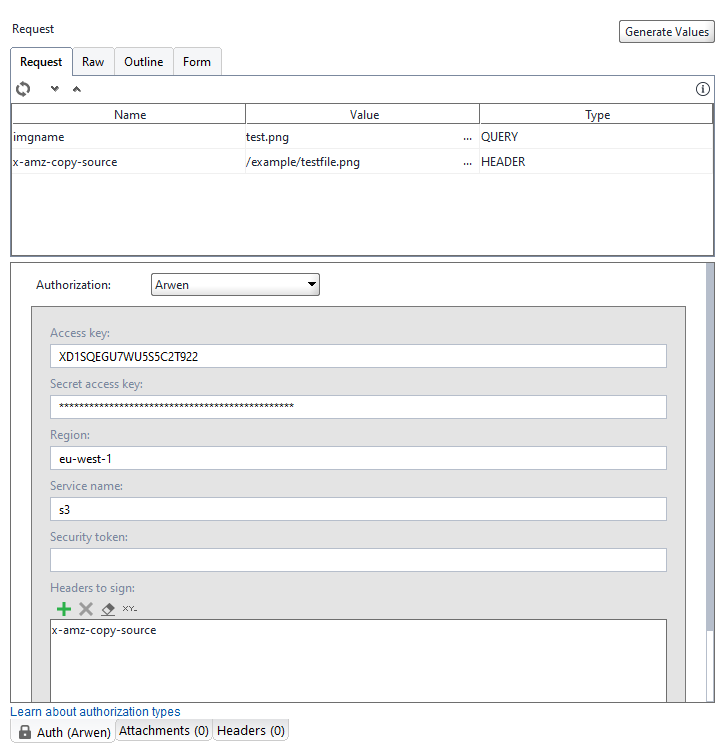 |
Field | Description |
|---|---|
Access key | Your access key. |
Secret access key | A secret access key for the specified access key. |
Region | The code of the region to which you want to send a request (for example, |
Service name | The namespace of the AWS service to which you want to send a request (em2, iam, s3, and so on). View the list of namespaces on the Amazon website. |
Security token | A security token required when you use temporary security credentials. |
Headers to sign | Adds the specified headers to the signature process. Use the toolbar to configure the list. |
Icon | Action |
|---|---|
Add a new header. | |
Remove the selected header. | |
Clear the list. | |
Rename the selected header. |