Generating JSON Web Token
A JSON Web Token (JWT) is encoded JSON data that contains a number of claims. In ReadyAPI, you can send JWT assertions to the authorization server to identify a client. To obtain an access token, send a JWT assertion using JWT Profile for Authorization Grants. You can also include a JWT assertion when using the Authorization Code, Resource Owner Password Credentials, or Client Credentials grant. This topic explains how to generate a JSON Web Token in ReadyAPI.
Note
In this context, "assertion" is an OAuth 2.0 term. Do not confuse it with the assertions you use in ReadyAPI to verify responses and requests.
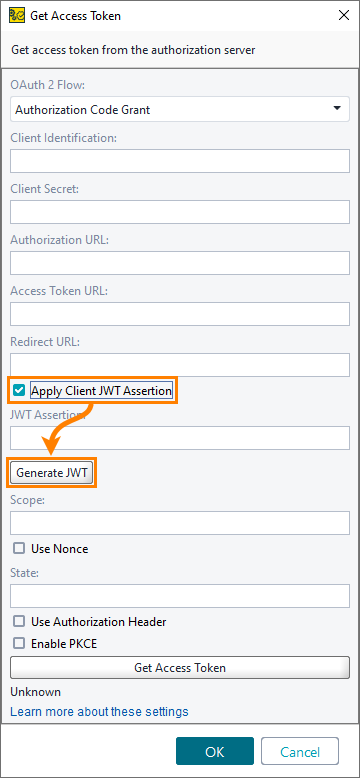
To generate a JSON Web Token, click Generate JWT when configuring a request for an access token. If you use the Authorization Code, Resource Owner Password Credentials, or Client Credentials grant, select Apply Client JWT Assertion first.
 |
Generate JSON Web Token Dialog
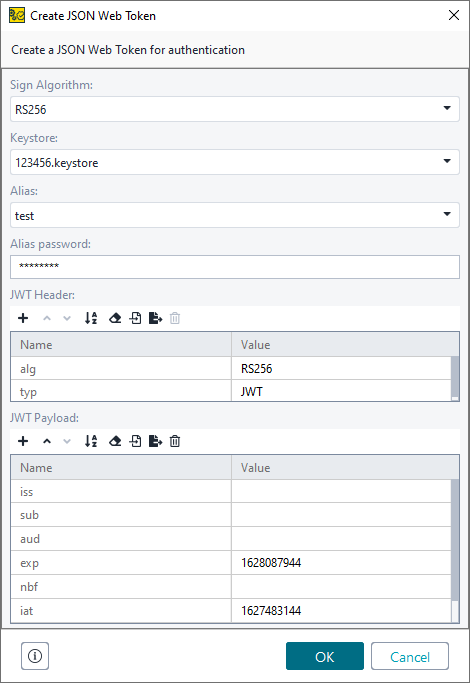
In the Generate JSON Web Token dialog, specify how to encode the JSON Web Token and configure the token content.
 |
Option | Description |
|---|---|
Sign Algorithm | The algorithm used to encode and sign the JWT. You can use the RS256 or HS256 algorithm. To skip the encoding algorithm, select None. |
Keystore | The keystore used for generate tokens. To add a keystore, use the Keystores tab in the WS-Security configuration dialog. |
Alias | The alias to use when generating a token. |
Alias password | The password used with the alias. |
JWT Header | The header part of the JSON Web Token. Using the property toolbar to add, remove, sort properties, load and save property values, or clear them. The header part contains information on how the JWT is encrypted. It typically consists of two elements:
The header may also contain additional elements. |
JWT Payload | The payload part of the JSON Web Token. This part contains the claims included in the JWT. The JWT payload contains the following claims to the authorization server:
|