OAuth 2.0 Basics
During the OAuth 2.0 authorization process, a third-party application requests access to a protected resource on a resource server. Four parties are involved in this process:
Resource server - hosts the protected resource. For example, if the resource server is a cloud storage service, the protected resource can be a file uploaded to that cloud.
Resource owner - the person who owns the protected resource. In the cloud storage example, the resource owner uploads the file or manages the storage. The resource owner grants access to the protected resource.
Client - an application that sends a request to a resource server to get or modify the protected resource. For example, a desktop application that downloads a file from cloud storage. ReadyAPI is also a client application.
Authorization server - issues an access token to the client after the resource owner grants access.
Authorization process
The authorization process works as follows:
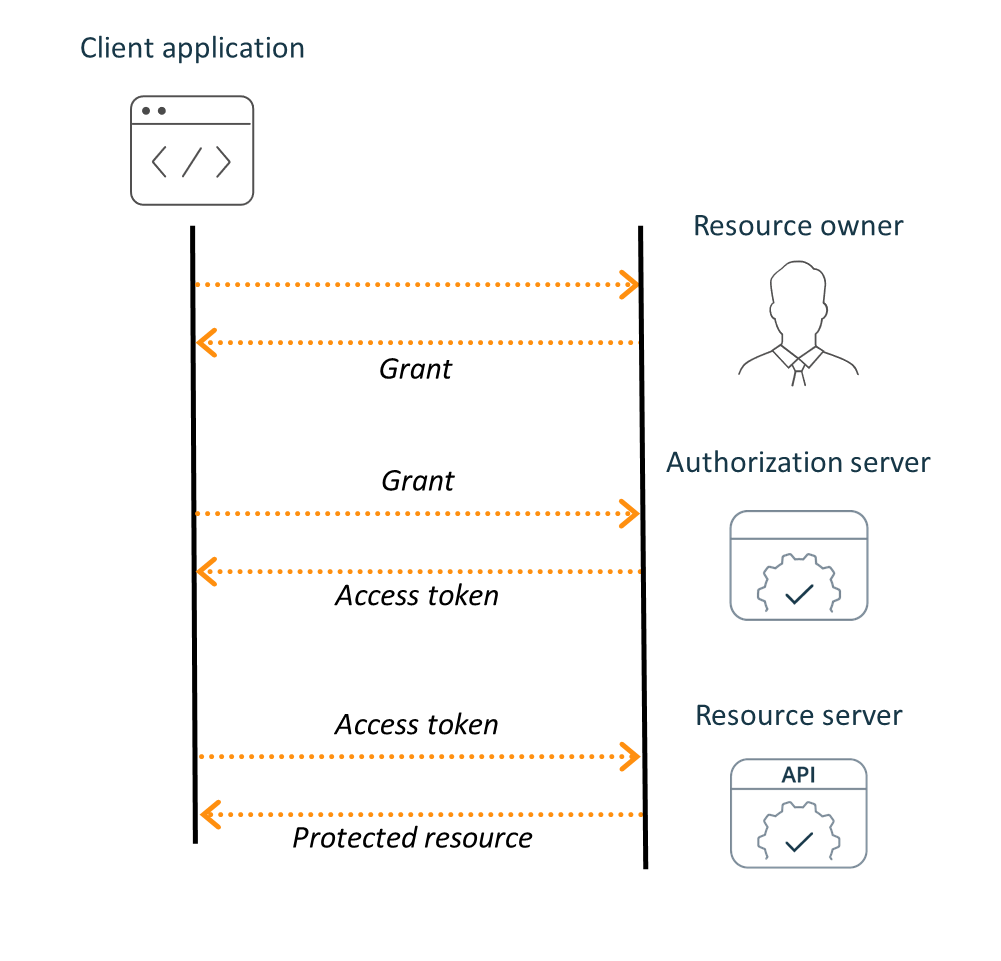 |
The client requests permission from the resource owner to access a protected resource. The owner's permission is represented by the Authorization Grant.
The client sends the grant to the authorization server to obtain an access token.
The client uses the received token to access the protected resource.
The process above is an abstract model. The real authorization process depends on the grant type. For example, when the Client Credentials grant type is used, the client does not interact with the resource owner and uses its own credentials to get an access token.
Tokens
OAuth 2.0 authorization uses two token types: Access Token and Refresh Token.
Access Token
An access token is a string used for authorization and authentication when accessing resources on the resource server. Token formats and structures vary based on the resource server's security requirements.
OAuth 2.0 supports two types of access tokens:
Bearer tokens - sent over HTTPS to ensure secure transfer, even when requests are neither signed nor encrypted. A request with a bearer token is considered authorized.
MAC tokens - more secure than bearer tokens. Similar to signatures, they allow partial cryptographic verification of requests.
Refresh Token
Refresh tokens are sent along with access tokens. Use a refresh token to get a new access token when the current one expires. Instead of repeating the normal grant procedure, the client provides a refresh token and receives a new access token. Using refresh tokens shortens the expiration time for access tokens on the resource server and lengthens the expiration time for accessing the authorization server. For more information, see Refresh Access Token.
Scope
Scope defines the level of access to the protected resource. For example, one scope can allow read access, while another can allow modifying the resource. To specify multiple scopes, use a space-delimited string.